🏆 Best AI PDF Tools (2026)
Discover the Best AI Tools
for working with PDFs
AI-powered PDF tools are transforming how we read, analyze, and interact with documents. From chatting with PDFs to summarizing research papers, these tools help users save time and extract insights instantly.
In this guide, we explore the best AI tools to chat with PDFs in 2026, with a strong focus on how they compare to AskYourPDF. Each tool is evaluated based on accuracy, ease of use, research capabilities, and overall value. Whether you need quick answers from a single file or a powerful system to manage and analyze multiple documents, this comparison will help you find the right solution for your workflow.

🥇 1. AskYour PDF — Best Overall AI PDF Tool
AskYourPDF is a powerful, all-in-one AI document platform built for users who need more than just basic PDF chat. It allows you to interact with documents conversationally, generate summaries and citations, and organize knowledge across multiple files — all in one place.
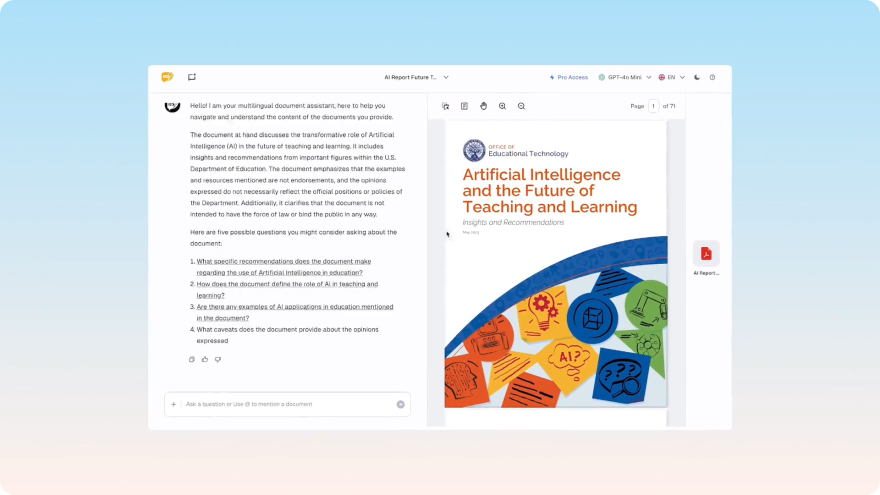
Why it stands out
- Chat with single or multiple PDFs
- Generate summaries and citations
- Build knowledge bases from documents
- Integrate with research tools like Zotero
- Designed for both individuals and teams
Unlike most tools that focus only on simple Q&A, AskYourPDF provides a complete workflow for working with documents at scale.
Best for
Students, researchers, professionals, and teams managing large volumes of documents.
2. Humata AI
Humata AI is one of the more well-known tools for chatting with PDFs. It allows users to upload documents and ask questions in natural language, making it useful for quickly extracting key information without reading the entire file.
The platform is designed for speed and simplicity, with a clean interface that makes it easy for new users to get started. It performs well for straightforward queries like definitions, summaries, and quick lookups within a document.
Strengths
- Fast and responsive document Q&A
- Easy to use with minimal setup
- Good for quick insights
Limitations
- Limited support for complex workflows
- No advanced research or citation tools
- Less effective for multi-document analysis
Compared to AskYourPDF
Humata is a strong choice for simple use cases, but AskYourPDF offers a more complete platform with advanced research tools, knowledge base features, and broader document capabilities.
3. Unriddle AI
Unriddle AI is built with a focus on research and understanding complex information across documents. It helps users connect ideas, highlight key insights, and build context while reading, making it particularly useful for academic and analytical work. Its interface encourages deeper engagement with content, allowing users to interact with documents in a more structured way compared to simple chat-based tools.
Strengths
- Strong research and context-building features
- Helps connect ideas across documents
- Useful for academic workflows
Limitations
- Slight learning curve
- Not optimized for quick, simple queries
- Fewer general-purpose features
Compared to AskYourPDF
Unriddle excels in research scenarios, while AskYourPDF balances both simplicity and advanced features — making it more versatile across different use cases.
4. PDF AI
PDF AI offers a straightforward way to interact with documents through a chat interface. Users can upload a file and begin asking questions immediately, making it accessible for beginners. The tool is focused on delivering quick answers and summaries, which works well for lightweight use cases. However, it doesn’t go much deeper beyond basic interactions.
Strengths
- Simple and beginner-friendly
- Quick setup and usages
- Clean interface
Limitations
- Limited depth in responses
- Minimal advanced features
- Not ideal for complex workflows
Compared to AskYourPDF
PDF AI is suitable for basic tasks, while AskYourPDF provides a more robust and scalable solution for deeper document analysis.
5. PDF GPT
PDF GPT enables conversational interaction with PDF documents using AI. It follows a similar approach to other chat-based tools, allowing users to ask questions and receive answers based on document content. While the concept is useful, performance can vary depending on the complexity and structure of the document. It works best for simpler files and straightforward queries.
Strengths
- Simple chat-based interaction
- Easy to understand and use
- Works well for basic queries
Limitations
- Inconsistent accuracy with complex documents
- Limited feature set
- Not built for large-scale workflows
Compared to AskYourPDF
AskYourPDF offers more consistent performance and a wider range of features, making it better suited for both simple and advanced use cases.
6. LightPDF
LightPDF is an all-in-one PDF platform that combines traditional editing tools with AI-powered features. Users can edit, convert, and manage documents while also accessing AI functionalities. This makes it a versatile option for users who need both editing and light AI assistance in one place.
Strengths
- Combines editing and AI tools
- Multi-purpose platform
- Useful for general document tasks
Limitations
- AI features are not the main focus
- Limited advanced document understanding
- Less optimized for research workflows
Compared to AskYourPDF
LightPDF is better for editing tasks, while AskYourPDF is designed specifically for AI-driven document analysis and workflows.
7. ChatWithPDF
ChatWithPDF offers a minimal interface for interacting with PDF documents using AI. It focuses on simplicity, allowing users to upload a file and start asking questions right away. This makes it accessible and easy to use, but also means it lacks depth in functionality. It’s best suited for quick, one-off tasks rather than ongoing or complex document workflows.
Strengths
- Lightweight and simple
- Quick to get started
- No steep learning curve
Limitations
- Very limited features
- Not suitable for advanced use
- No scalability for larger workflows
Compared to AskYourPDF
ChatWithPDF is useful for quick tasks, while AskYourPDF provides a much more powerful and scalable experience.
8. HiPDF
HiPDF is a PDF toolkit that includes editing features alongside some AI capabilities. It’s designed for users who need to perform common document tasks such as editing, converting, and compressing files.
Strengths
- Wide range of PDF tools
- Easy-to-use interface
- Good for general document tasks
Limitations
- Limited AI functionality
- Not focused on document intelligence
- Lacks advanced research features
Compared to AskYourPDF
HiPDF is more of a traditional PDF tool, while AskYourPDF is built for AI-powered document interaction and analysis.
9. UPDF
UPDF is primarily a PDF editor that includes some AI-powered features. It’s useful for annotation, editing, and organizing documents, making it a good choice for users who need traditional PDF functionality.
Strengths
- Strong editing and annotation features
- Lightweight and efficient
- Good for document management
Limitations
- Limited AI capabilities
- Not designed for deep analysis
- Lacks advanced automation features
Compared to AskYourPDF
UPDF is best for editing workflows, while AskYourPDF focuses on intelligent document interaction and advanced AI capabilities.
10. SmallPDF AI
SmallPDF is a widely used PDF platform known for its editing, compression, and file conversion tools. With the introduction of AI features, it is expected to expand into document interaction and intelligent processing. Given its large user base and existing ecosystem, SmallPDF AI could become a convenient option for users who already rely on its traditional PDF tools and want lightweight AI capabilities integrated into their workflow.
Strengths
- Trusted and widely used PDF platform
- Strong ecosystem of document tools
- Likely to offer seamless integration with existing features
Limitations
- AI capabilities still developing
- May focus more on convenience than depth
- Limited advanced research features
Compared to AskYourPDF
SmallPDF AI has strong brand recognition, but AskYourPDF currently offers a more mature and feature-rich AI experience focused on deep document understanding.
11. Adobe Acrobat AI
Adobe Acrobat is one of the most established names in the PDF space, and its move into AI is expected to bring advanced document intelligence to a massive global user base. With deep integration into Adobe’s ecosystem, Acrobat AI will likely offer powerful features such as summarization, document insights, and contextual assistance within professional workflows.
Strengths
- Industry-leading PDF platform
- Strong enterprise capabilities
- Deep integration with existing workflows
Limitations
- AI features still evolving
- Potentially complex and expensive
- Not fully optimized as an AI-first experience
Compared to AskYourPDF
Adobe brings legacy strength and scale, while AskYourPDF offers a more focused, flexible, and AI-first approach to working with documents.
12. Scholarcy
Scholarcy is a tool designed specifically for summarizing academic papers and extracting key insights from research documents. It focuses on breaking down complex content into digestible summaries, highlights, and structured outputs. This makes it particularly useful for students, researchers, and academics who need to quickly review large volumes of scholarly material.
Strengths
- Strong academic summarization capabilities
- Designed for research and scholarly content
- Helps extract key insights quickly
Limitations
- Limited conversational AI features
- Narrow focus on summarization
- Less flexible for general document use
Compared to AskYourPDF
Scholarcy is excellent for summarizing research papers, while AskYourPDF provides a more comprehensive platform that includes chat, analysis, and broader document workflows.
How to Choose the Right AI PDF Tool
- When selecting an AI PDF tool, consider:
- Do you need simple Q&A or advanced workflows?
- Are research features like citations important?
- Do you need integrations or team collaboration?
- Are you working with multiple documents or knowledge bases?
Final Verdict
Students, researchers, professionals, and teams managing large volumes of documents.
However, if you're looking for a complete, scalable, and feature-rich solution, AskYourPDF stands out as the most versatile option — combining document chat, research tools, and AI-powered workflows in one platform.
Loved by +5 million people
Make your academic and professional life easier with AskYourPDF
Products
Developers
Free tools
Company